

Produce packshot views
Alongside your on-model views, AI Shoot can produce packshot views: the product alone, on a clean background, generated from the same SKUs. A packshot view is one more view of your Shoot, so your packshots and on-model images are produced together from a single setup.
Set up a packshot view
Section titled “Set up a packshot view”In the Define the views to produce step of your Shoot:
- Click the icon next to the view number to switch the view from on-model to packshot.
- In the Framing / Ghost mannequin column, choose the render style:
- Flat: the garment is rendered flat, as if laid out on a table.
- Full: the garment is rendered with full volume, as if worn by an invisible mannequin.
- Create your Looks as usual. A Hero SKU is required, since it is the product the packshot depicts. If all your views are packshots, you don’t need to select a model.
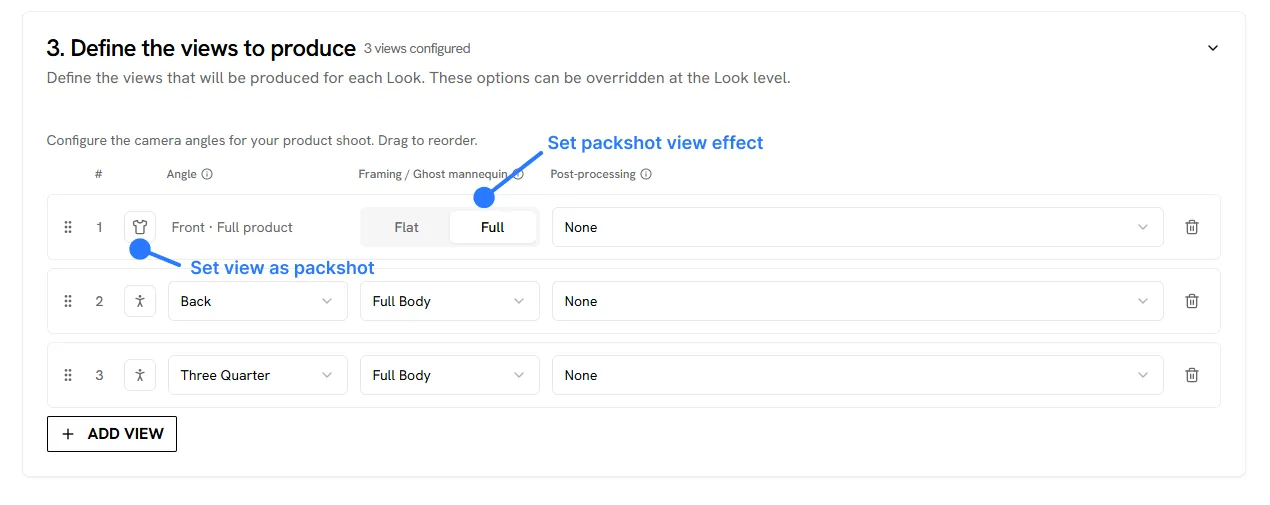
Packshot views are produced from the front. Render styles apply to garments only: shoes and bags are rendered as a clean packshot. On the results page, packshot views are marked so you can tell them apart from on-model views.
See Create your first Shoot for the full Shoot setup.
Get the best results
Section titled “Get the best results”Check the AI Packshot input requirements for what your images should look like, the supported products, and the current limitations.